Deploying to Production
This document outlines the steps for the Stratasphere repository, all the Strata powered sites.
Regular Release
Squash and merge Pull Request
"Squash and merge" any open Pull Requests that are ready (have passed QA and have been approved) into the
developbranch.There is a view in Linear called "Ready to be Merged" for tickets that have passed Code Review, VDQA, and QA. These tickets are safe to be merged into
develop.
Update dependencies
Checkout the
developbranch.Ensure that you have the latest committed Composer dependencies:
composer install
Update Composer dependencies:
composer update
Bump version numbers:
composer bump
Commit dependency changes to the
composer.jsonandcomposer.lockfiles only and put the following in the comment message and description.Message: "Update dependencies".
Description: Copy the "Changelogs summary" provided at the end of the
composer updatecommand in the terminal. Looks something like this:Changelogs summary: laravel/framework updated from v10.37.1 to v10.37.3 patch See changes: https://github.com/laravel/framework/compare/v10.37.1...v10.37.3 Release notes: https://github.com/laravel/framework/releases/tag/v10.37.3 phpstan/phpdoc-parser updated from 1.24.4 to 1.24.5 patch See changes: https://github.com/phpstan/phpdoc-parser/compare/1.24.4...1.24.5 Release notes: https://github.com/phpstan/phpdoc-parser/releases/tag/1.24.5 phpstan/phpdoc-parser updated from 1.24.4 to 1.24.5 patch See changes: https://github.com/phpstan/phpdoc-parser/compare/1.24.4...1.24.5 Release notes: https://github.com/phpstan/phpdoc-parser/releases/tag/1.24.5 pusher/pusher-php-server updated from 7.2.3 to 7.2.4 patch See changes: https://github.com/pusher/pusher-http-php/compare/7.2.3...7.2.4 Release notes: https://github.com/pusher/pusher-http-php/releases/tag/7.2.4 astrogoat/strata updated from 0.4.51 to 0.4.52 patch See changes: https://github.com/astrogoat/strata/compare/0.4.51...0.4.52 Release notes: https://github.com/astrogoat/strata/releases/tag/0.4.52 astrogoat/osano updated from 1.1.0 to 1.3.0 minor See changes: https://github.com/astrogoat/osano/compare/1.1.0...1.3.0 Release notes: https://github.com/astrogoat/osano/releases/tag/1.3.0
Push up the commit.
Create a new release candidate
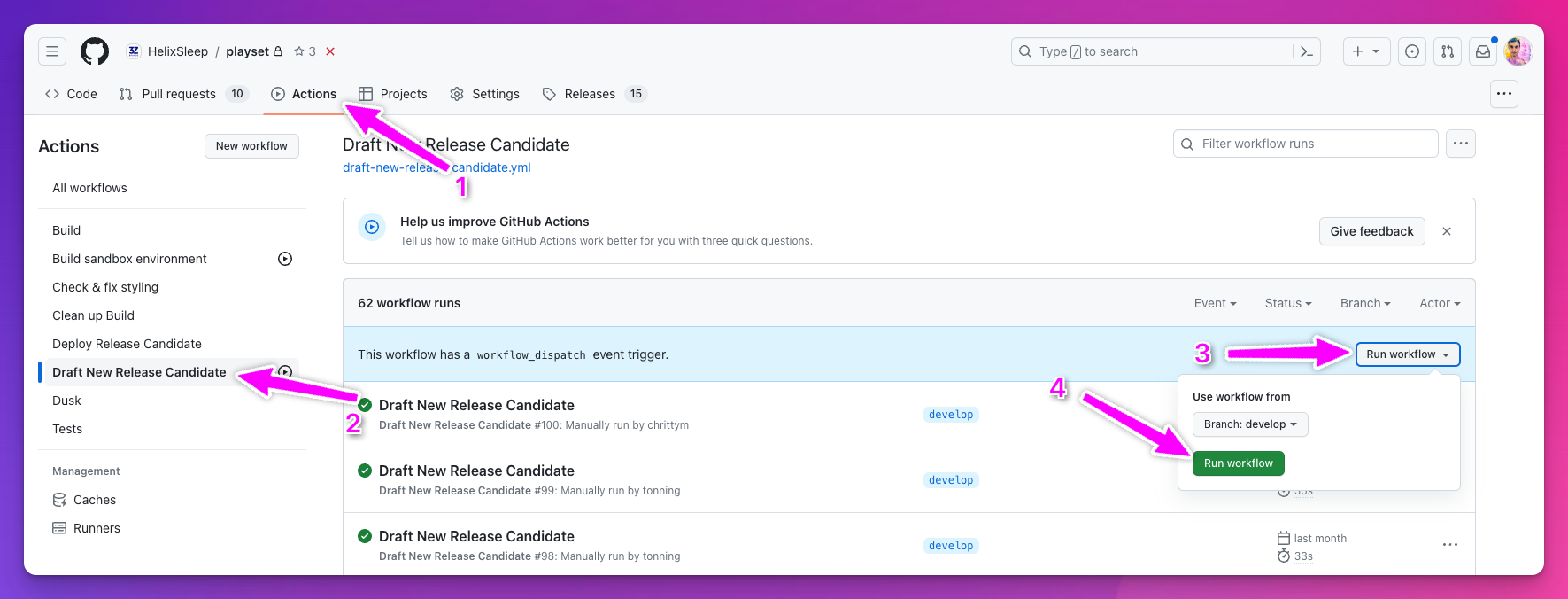
Go to Github's action page under the Stratasphere (playset) repository.
Click "Draft New Release Candidate".
Drafting a new release candidate will provide you with a version number for later steps.
Open the "Run workflow" dropdown and make sure the
developbranch is selected.Click "Run workflow.
This will create a new release candidate by:
Bumping the semantic minor version number.
Creating a new branch with the following naming convention:
release/VERSION_NUMBER.Pushing up the branch to
origin.Creating a new PR to merge into
mainDeploying the new release candidate "Staging" via Envoyer.
QA Staging
Let the QA team know that "Staging" has been deployed with the latest release candidate.
Update Linear tickets
All the tickets that have gone into the release branch need to update their statuses to "In Staging" and be assigned to the QA team (Christy Morris).
Wait for the QA team's approval before proceeding to the next step.
Prepare to deploy to Production
After getting the go-ahead from the QA team, you can now merge the release branch into main and develop using git flow.
Before finishing the release, make sure to be up-to-date on develop and main
If git asks for a merge strategy, use the default.
Ensure that you add the tag when prompted for the release version (<VERSION>)
Now you can push up the develop and main branch, and also the newly created tag. We need the tag to be pushed up as we use it as our reference when deploying to "Production".
Deploy to Production
When all the tickets in the release candidate have the status of Ready for Production we can deploy it to Production.
Ensure the QA team is aware and ready to perform their QA and smoke tests as soon as the deployment goes live.
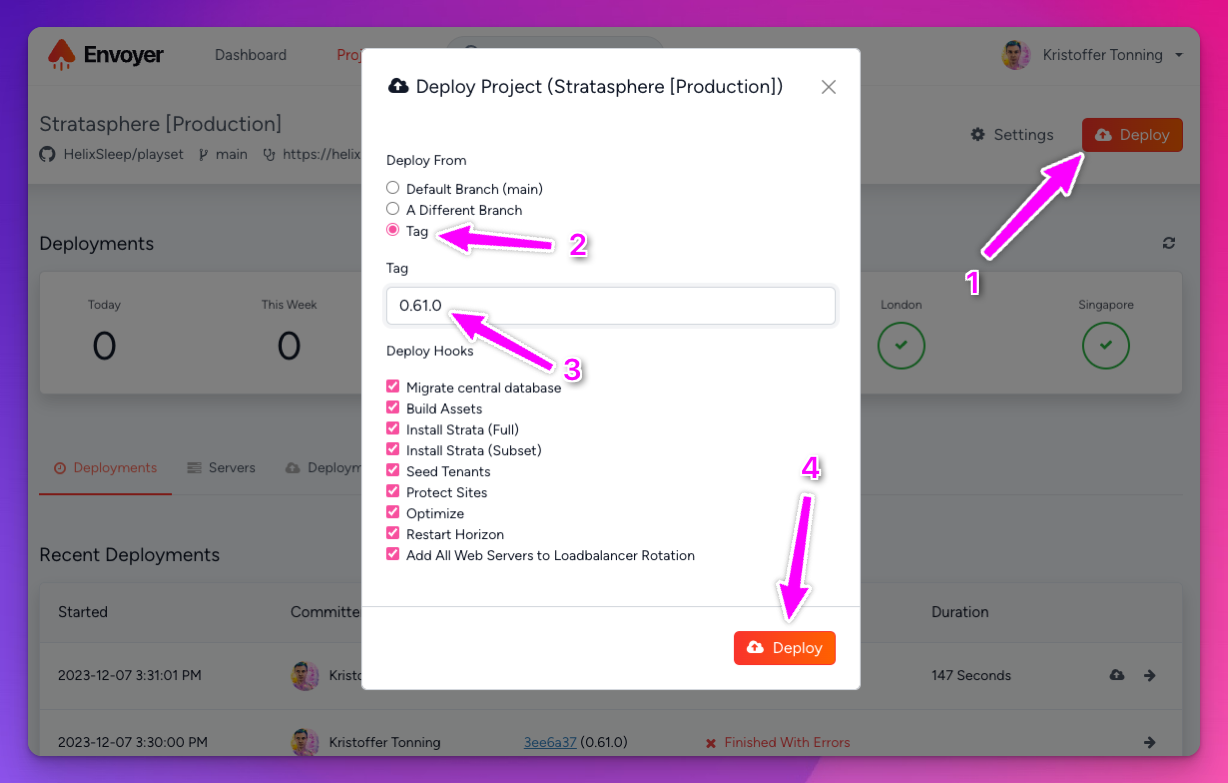
Go to Envoyer and find the Stratasphere Production project.
Click the "Deploy" button to open the modal.
Select "Tag" as the "Deploy from"
Select the latest tag. Make sure this is the newest version that you have just pushed up.
Click the "Deploy" button in the modal to kick off the deployment process.
Verify the deploy completed successfully
Open the newly kicked-off deployment in Envoyer under the "Deployments" tab and make sure all the steps are completed successfully.
If new database migrations have been introduced in the release, the deployment will likely fail on the "Install Composer Dependencies" step. If this happens, repeat the "Deploy to Production" step above.
This is because we have a custom Composer script that runs php artisan lego:install on composer install, the lego:install the command is also running the migration command, but since this Envoyer step is being executed on multiple servers, there is a chance of one or more of the servers running into a race condition where the database has already been migrated before the server in question has had a chance, and Laravel will throw an error that the migration has already be migrated.
A Slack notification with the status of the deployment should have been posted to the deployment-notifications Slack channel.
Hot Fix
In progress. Coming soon...
Create a new hotfix branch
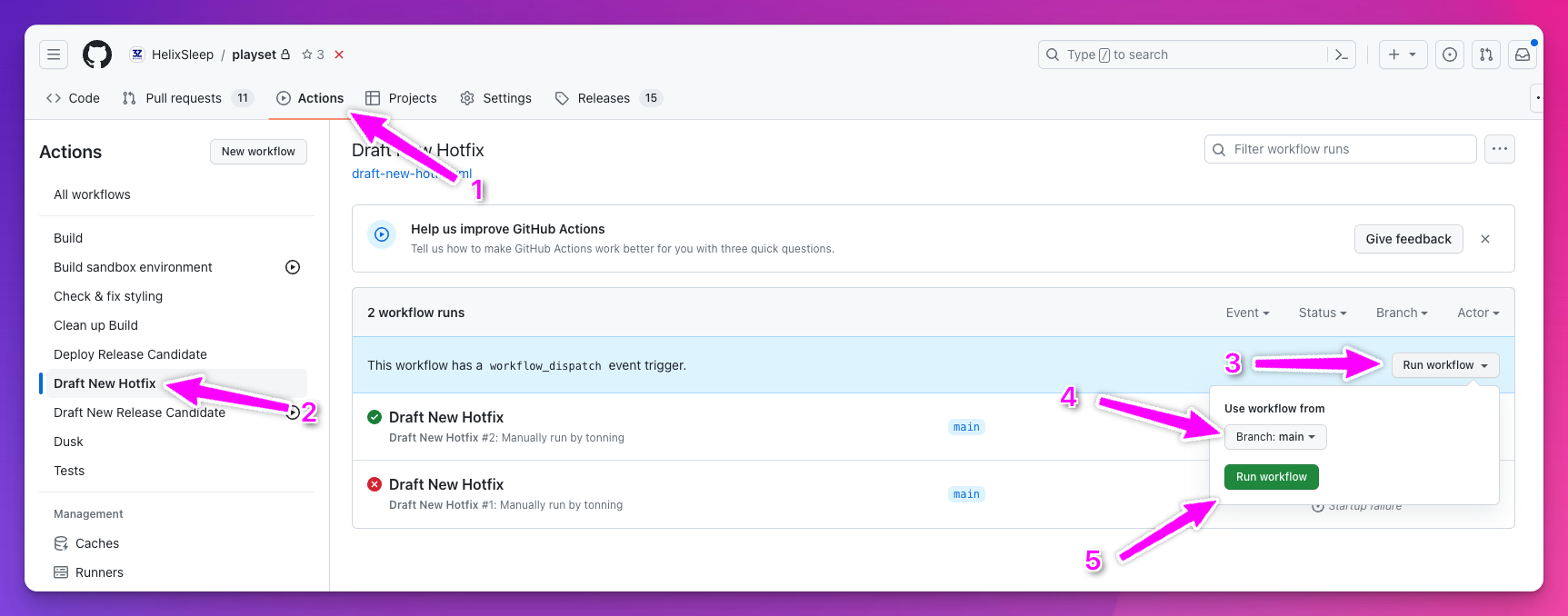
Go to Github's action page under the Stratasphere (playset) repository.
Click "Draft New Hotfix".
Open the "Run workflow" dropdown
Important: Select the
mainbranch.Click "Run workflow.
This will create a new hotfix branch by:
Bumping the semantic patch version number.
Creating a new branch with the following naming convention:
hotfix/VERSION_NUMBER.Pushing up the branch to
origin.Creating a new PR to merge into
main
Include your changes
Pull down the new empty hotfix branch created by the GitHub action.
Commit your changes to the branch.
Last updated