Re-platforming to Strata
Part of re-platforming a store off of Shopify and on to Strata is by running an A/B test with 50% of all traffic split between the existing (original) Shopify store and the new Strata powered site. How we usually do this is by having the Strata site live on a shop. subdomain.
Steps for setting up the the Strata production site/environment.
Make sure the code for the new site has been deployed and installed on the production environment.
Create the
shop.[DOMAIN].comDNS entry. This should be anArecord pointing to the Forge server/load balancer.Update the Nginx config to include the new
shop.[DOMAIN].comdomain. This can be done in Forge by going to the "Meta" tab for the server and adding the domain to the comma separated string of domains in the "Aliases" field.\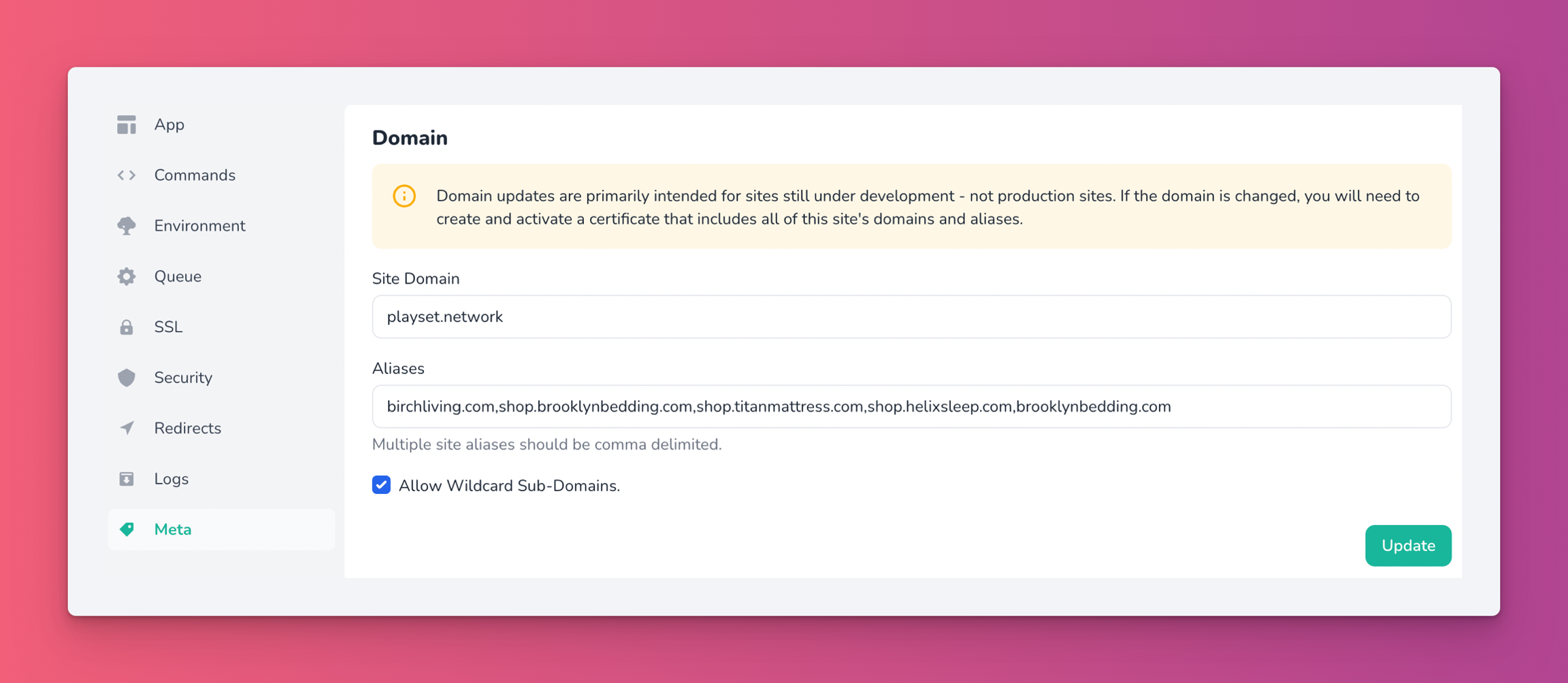
Obtain a new SSL certificate with the new domain included. Easiest way to get a new free certificate is through Let's Encrypt, again we can do this in Forge via the "SSL" tab on the server.
First click on the black box for the currently activated certificate to copy the currently used domains. Important: If the DNS is controlled by Cloudflare and Cloudflare is also trying to provide a SSL certificate, then make sure to set the
ADNS record to "DNS only" (not proxy).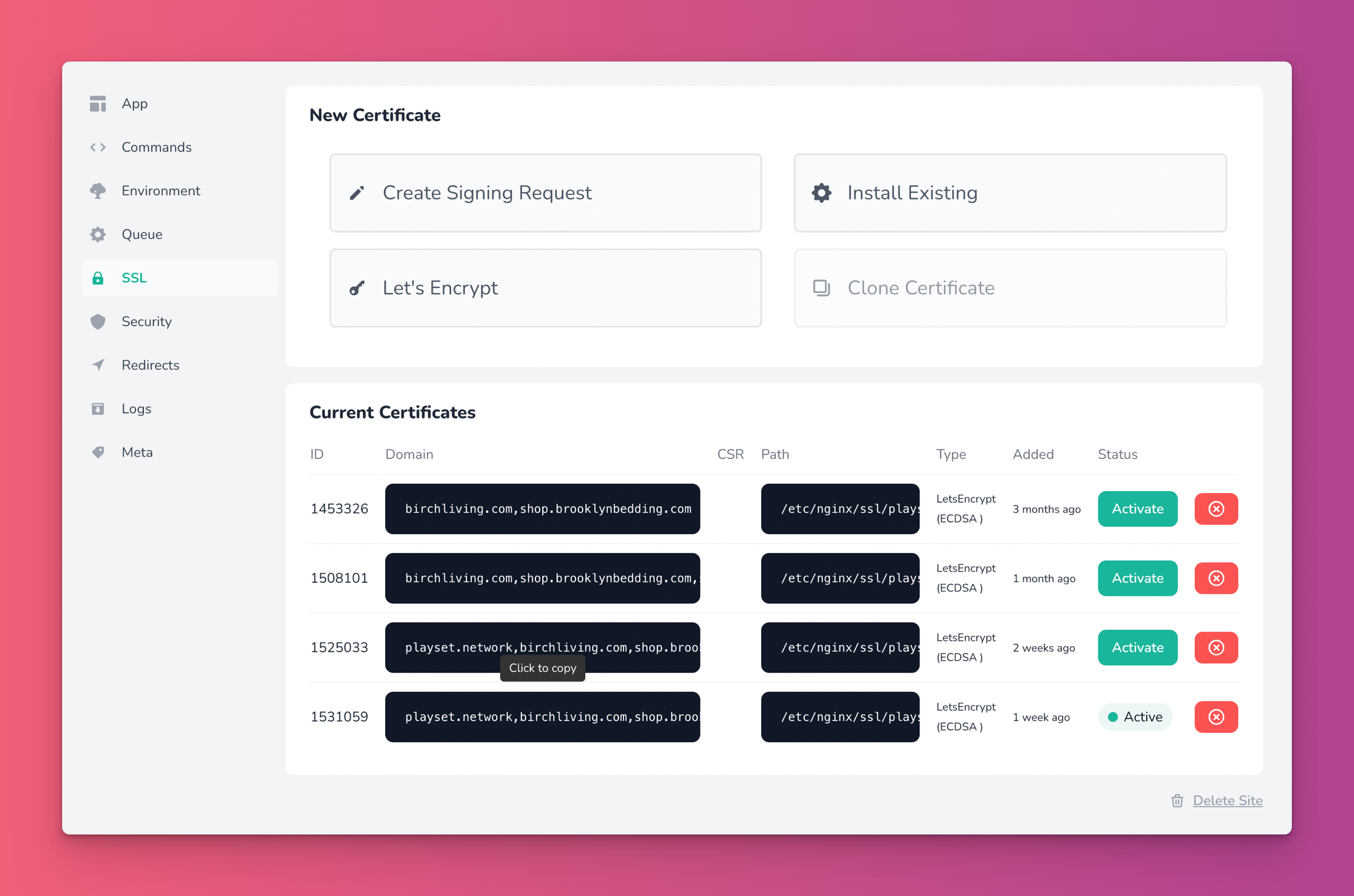
Then click the "Let's Encrypt" button and paste the copied domains string. Now add your new domain to the end of the string (separated with commas).\
Click the "Obtain Certificate" button and wait for it to finish installing and then activate it.
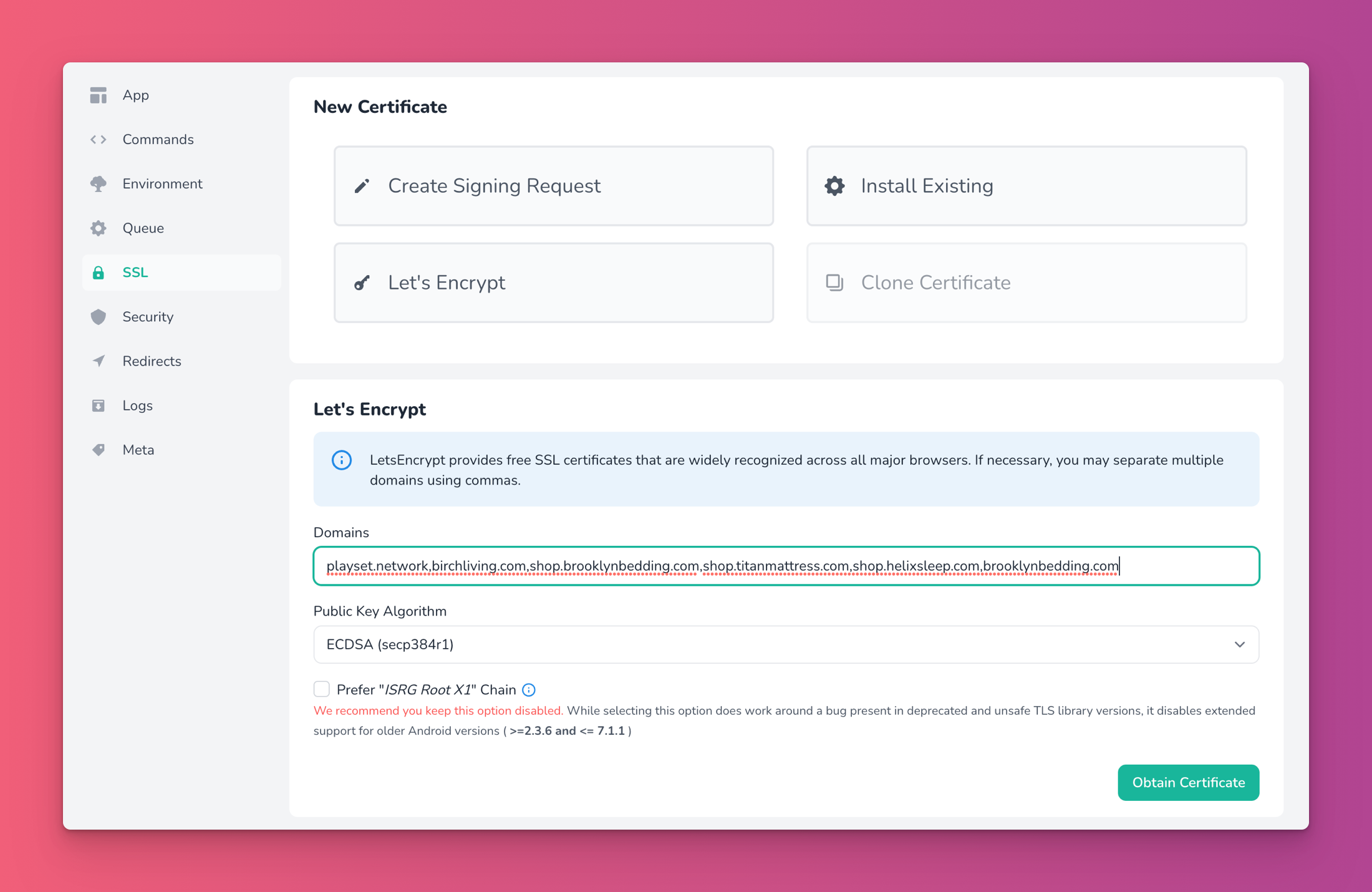
You should now be able to access the new domain
Set up "Sender Signature" in Postmark for the new domain.
Login to Strata and update the mail settings to have a "From name" and "From address".
Invite the product team to the site.
Promoting the Strata powered site to be the primary store
Outlined below are the steps needed to be taken in order to move a "development" Strata site from shop.[DOMAIN].com to [DOMAIN].com. The main key takeaways is are, one, we need to point the TLD i.e. helixsleep.com to our Forge server that hosts the Strata application, we do this via the DNS records. Two, since we still need to use Shopify for the checkout portion we need to have Shopify live on a subdomain, usually checkout.[DOMAIN].com, we also accomplish that be creating a A DNS record that points to Shopify's servers and then instruct Strata (via the settings) to use that "checkout" subdomain. To accomplish all of this you need access and permission to alter the DNS records for the given domain.
Make sure that the Terraform script has the new domain and run Terraform
Make sure the installed SSL certificate has the new domain installed on the load balancer in Digital Ocean.
Create a DNS
Arecord that pointscheckout.[DOMAIN].comto Shopify (23.227.38.65- double check with Shopify docs).Create a DNS
CNAMErecord that pointswww.checkouttoshops.myshopify.comConnect the
checkout.[DOMAIN].comdomain in Shopify (under Settings -> Domains).Make
checkout.[DOMAIN].comthe primary domain in Shopify.Make sure no other domain are listed in Shopify (except for
[DOMAIN].myshopify.com).Update the DNS
Arecord for[DOMAIN].comto point to the load balancer.167.172.14.23as of August 15, 2023
Set the checkout URL in Strata (Apps -> Shopify) to
checkout.[DOMAIN].com.Update database entities URLs. (See MySQL snippets)
Make sure the new domain is associated with the tenant in the "Playset" database (
domainstable).Remove site protection
Remove site from the "Protect Sites" deployment hook in Envoyer.
Remove site from
resource "laravelenvoyer_hook" "protect_sites" {in the Stratasphere Terraformmain.tffile.Remove password protection in Admin (if enabled).
As of Aug 15, 2023 there Strata/(sphere)'s password protection does not work great with multi tenancy application, so make sure this removed on all the webservers.
Mark pages as indexable.
Install Shopify webhooks via the Shopify app in the Strata admin
Redirect any traffic from
checkout.[DOMAIN].com->[DOMAIN].com(this won't impact customer redirect from their cart in Strata to their checkout.Add following as the very first line in the
<head>section of thetheme.liquidfile in Shopify.
Let a PM know when process is complete
MySQL snippets
sections
bricks
menus
items
metafield_values
value